Struggling, surviving or succeeding with ICT
'stuff' in the 'jungle' (classroom).
Learning
to teach is hard enough, even when it is something that you are a 'natural' at,
but when you decide to deliver a lesson using anything that is more complicated
than a normal whiteboard and markers then it is a whole new playing field and
perhaps one that is littered with very explosive mines.
PowerPoint’s:
My
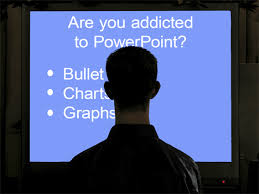
first experience with technology was with a PowerPoint. I designed one for my
prac class in my first year of teaching and have used these many times since. I
absolutely love these. They are a very good teaching tool, and if designed
thoughtfully they can engage and encourage students to contribute as they
learn. I like to use them as a hook and love to add a humorous element to each where ever possible. I have used these for Maths, English, Literacy, Art and Science lessons and I am constantly thinking of ways I could improve each Power Point I create. My first
PowerPoint was very basic, colourful, but just words on colourful backgrounds.
I soon learnt to upload my own images and to add little things that hop or jump
all over the screen. The kids love these. I can now make words emerge,
disappear, roll, float etc and much time can be spent making each one
more perfect. After much practice I can now whip up a
PowerPoint in a matter of 30 mins if needed. (Love quick creations that that look like I have
spent hours of work on).
Photo stories!!
What
can I say!! I absolutely love these and see such potential for these in the
classroom. I have used these successfully in a few assignments however I have only had one chance to use this tool in the classroom. Art is my passion
and I truly believe that teaching children how to express themselves through
art, and how to be creative, should be a vital part of their education. Studies
have shown that people who can use some sort of creativity, such as those who can write stories or poetry, sing, play an instrument, compose music, dance, draw, paint, sculpt, or design, find the many emotions and problems life throws at them easier to cope with. Teaching children how to express emotions, for example, how to paint
a mood allows children to express and share their inner feelings. I teach
children how they can use colour to represent their emotions as they paint (thrown on, dabble, splatter, smudge, smear, dot,
etc) their happiest and their angriest/saddest moments in their lives.
I
have also used this same art technique to teach literacy. After creating an
artwork in the same fashion the students are guided/taught to discover a
'story' in their piece of art. The students find the most amazing things in
these textured pictures and love to elaborate as they share their discoveries.
Once they have found their stories they are then led to write these using
'Golden' descriptive language. (i.e. instead of saying ...The big dragon flew
through the sky...they may say....The mighty dragon flexed its muscles as it
soured into the inky night sky.) A photo story is a wonderful method to
show the class all of their amazing paintings and descriptive stories or poems
and because the children are so proud of their work it becomes a very powerful
and engaging tool to use. As I said I LOVE photo story.
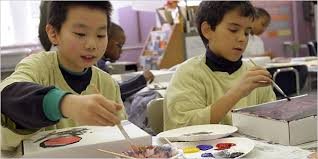
After
we wrote our stories or poems I loved the ability to take children's art works
and poems and put these to music in a photo story and the class watched this,
amazed at how beautiful their Art Stories were in the final presentation.
Weeblys
I have created two weeblys
in my uni life...
...and will continue to use
this tool as a teacher. I really enjoyed almost everything about this website
and found it relatively easy to understand. Like anything new, there were a
couple of things I found confusing but with perseverance I soon worked it
out. Would I ask students to use these in a class room? Certainly, in higher
grades, however perhaps these may be too complicated in any grade lower than
year 5-6. Even in the higher grades the students would need very clear scaffolding. The
time that this would take would be worth it as being able to create your
own web site is very cool!!! What an engaging way to ask a student to present
an assignment. I visualise these being used in so many ways.
For example:
English: A Yearlong Portfolio of literature and
literacy
1. Students could write poems
or short stories and illustrate them-upload photos from the web or create their
own paintings etc…. and after photographing these… upload the photos.
2. Students could add new
pages to their portfolio as they discover famous poems or books and discuss the
author’s methods and subjects.
3. Students could add a page
or pages of difficult words, (spelling) and they could add ways to help them
remember how to spell them either by goggling ideas or just by thinking about
and inventing their own “tricks” and recording these onto the page or adding links.
4. Students could use another
page or pages to record ideas. For example: Great descriptive words or phrases
or ideas for stories or poems.
This portfolio would be
much more engaging for the student to create than the old pen and paper method
and can offer so much more such as live links and access to the World Wide Web
for information and resources.
For the teacher it would
be a wonderful way to assess the students learning and understanding. Other students
could have access to their peer’s Weeblys. Being able to view peer's ideas can
lead to further understanding of literacy as children read children’s comments
and postings.
Additionally parents could
easily read and be a part of their child’s education and perhaps offer ideas to
their children.
One other benefit of this tool, and indeed all wikis, blogs etc, is that there are no ‘books’ to be destroyed,
lost or left behind. Once these are created they can be accessed from any
computer.
Wikis
I have
never used wikis as a teacher however I have used these as a student and I must
admit I have not found them to be extremely friendly. I am sure it is my
problem and lack of understanding as many of my peers are perfectly comfortable
using these. My first introduction to a wiki was in a group work for a maths
assignment. My group agreed to 'meet' on the wiki as we were all very busy
people who found it hard to find a time when we could all
meet. The wiki seemed to be the solution and the person who suggested it was
enthusiastic. However, I was never very
sure of what I was doing, or where to type...etc etc...so I tended to still
stick to the old method of send an email.
I would have liked more time to get
my head around the wiki but of course time is very precious and it was all
about the actual math's assignment.
I am researching now and looking closer at
wikis and I know this course will help me understand their potential in the
classroom...they must be good as my friend who chose the wiki idea had already
completed E Learning and understanding its value, was very enthusiastic about
using it.
I think I am mainly worried about accidentally erasing someone else's
work and of course making a nuisance or fool of myself. I am now trying to
think of ways wikis could work in classrooms and how they could
contribute to learning and I believe there would be many. Using a wiki to link
the class with a 'sister' class could be one such way. It is like an online
discussion
Vokis
 I have used vokis very
successfully in a year 5 classroom when I was on prac. I used a voki to introduce a lesson in art on how colours can represent moods. After the children had completed their artworks they were then asked to write a
short poem about the feelings or stories in their artworks for homework. Only 6
students completed this task and I then created a voki which looked like them
and made the voki say the student’s poem. The voki was then placed on a PowerPoint
next to the student’s artwork. This lesson was received very enthusiastically
with all the other students who had not completed the task rushing off to write
their own poems or stories after begging me to make one for them.
I have used vokis very
successfully in a year 5 classroom when I was on prac. I used a voki to introduce a lesson in art on how colours can represent moods. After the children had completed their artworks they were then asked to write a
short poem about the feelings or stories in their artworks for homework. Only 6
students completed this task and I then created a voki which looked like them
and made the voki say the student’s poem. The voki was then placed on a PowerPoint
next to the student’s artwork. This lesson was received very enthusiastically
with all the other students who had not completed the task rushing off to write
their own poems or stories after begging me to make one for them.
I only had one chance to use this tool with this class, but this is something that I
would use regularly in my own class to encourage students to complete work such
as poetry and short stories. It could be even more beneficial, particularly in
older grades, to teach the students how to create their own vokis. They could write a poem then, after approval from the
teacher (yes poem meets the requirements), create their own voki and record
their own voices as they recite the poem. This could then be presented to the
class. Vokis or avatars are a great way to hook and engage children of all ages
from prep to my age. (Which is very old).
Blogs
Please see my other conversations about
blogs on this blog. I have never used these in the classroom yet…but I will!!!
I love them!
Googledoc
I have only just learnt to start and use
one of these as a tool to interact with my partner for a uni course. Wow!! What
a wonderful way to ‘talk’ and work together on an assignment!! Where has this
been all my life!?
Actually this same partner has repeatably tried to engage me
with these in previous courses and I never really gave them a chance. I can be
stubborn! But this time she lead me over the phone to start one myself and what
a difference!! I think this has been a really good lesson for me…get the
learner to do it for themselves…do not do it for them. It is amazing the
difference this makes to learning.
What I love about this type of tool is that
we don’t get distracted so much by general chit chat, which we have been known
to do in the past. It is harder to chatter when you have to type everything, so
we seemed to concentrate more on the topic, the assignment...and that is a
very good thing.
Additionally, as we both live some distance from
each other and being very time poor this was a way we can meet easily and regularly, even for just
a half an hour. A quick phone message…”Hey I have a spare 15 mins…want to meet on Google doc ?” and hey presto…we are in a meeting. Easy!
In a classroom…I can
see this being a very useful tool in upper grades for exactly the same reasons
as I have just listed above. When students are working in groups, particularly
on a set assignments, this tool will allow them to interact easily as they complete any set project.
Perhaps
parents could also be invited to offer ideas and it would be a good way to allow parents access to see what their children as learning.
Lastly, teachers would be able to monitor who is
contributing, what is being discussed, who needs guidance, who has got it….etc…etc…
Sky drive
I am not too familiar with this tool as
yet, but my understanding of it is as follows.
It is like a bank up in the sky
where we can upload and download all our files. We can share them with others
and our files are safe. That is about all I know as yet. In the school
situation I guess this would be a very safe way to store important 'stuff'.
I
know I sound pretty vague but that is because I have not really played with
this yet and I will not pretend to know something 'that about I am hazy about.
And that ends today’s posting on my blog…all about ICT’s and
other amazing stuff.
The teacher’s job is very different today from the teacher I had
when I was a student. I started school writing on slates and our teacher was
able to throw the blackboard duster at us whenever she felt like it. Technology
was not even a word in school and the most amazing thing I saw in my high
school years was a calculator and the library’s computer. This computer was
used for the librarian to record the books not for any other reason.
The biggest thing that could go wrong in primary school for our
teachers was if they forgot to bring a book or the kids all had no pencils. The
only electronic thing that caused disruption when it failed was when the
electricity went out but even that did not really disrupt lessons. If a room
was lucky enough to have a ceiling fan, then things just got hotter.
Today, however things are much more complicated…there is so much
more that can go wrong and teachers have to be very up to date with technology.
I have not had any problems so far in my short experience with ICT’s in the
classroom, other than not being able to get the interactive white board to
start up once. Luckily the teacher came to my aid, but if she had not been
able to help I would have been in trouble. I had nothing else ready to fall
back on and I realise now how important it is to always have a backup plan.
Technology in the classroom, wow!! ....how quickly
it could become...terror in the classroom! The secret is to plan, test, try,
plan, test and try again and have good backups and other ideas ready to grab
with sweaty palms if, and when needed.


